Showing posts with label iPad. Show all posts

Sunday, June 30, 2019

Wallpaper: Tree

Click on the image below to download the full resolution version!

Wednesday, June 26, 2019

Sobble (メッソン) Wallaper

It's Sobble, the water type starter for the Galar region in the new Pokemon Sword and Shield games.

Also, you can download iMessage sticker versions of the Sobble expressions in this wallpaper. Click on the iMessage Sticker icon below.
Click the image below to download the full resolution version!

Wednesday, June 10, 2015

Concept: Expiring Notifications

A clear all button in Notification Center is probably one of the most requested features for iOS. Apple added it on the Apple Watch using Force Touch but "clear all" has yet to make its way over to iOS. It would be very handy to be able to clear out all notifications with a single tap but I would also like to see Apple automate how notifications are handled. This concept will focus on that idea and can be split into two main parts: the first requires some tweaking in Settings and the second won't but will be targeted towards a specific category of apps.

Part 1: Recent Notifications
Let's start by analyzing the current (iOS 8.3) offering for controlling notifications. Some default Apple apps get special treatment and have more options while some have less but this is what the typical app will offer you: Do you want notifications from this app? If so, how many do you want to be displayed in Notification Center? Will these notifications make a sound, appear on your lock screen and so on.


What iOS offers for notification management works great except for the "Show in Notification Center" option. Show the 5 most recent notifications should automatically remove old items once the notification count exceeds the set limit, instead iOS stores all of those notifications and displays them once you delete one of the recent items. Personally, I don't get why anyone would want to see month-old notifications that were hidden.

The solution? A new setting that allows you to control how long iOS holds on to notifications sent from a certain app. For example in Mail, you can specify that you only want Notification Center to hold on to email notifications for today, and once tomorrow starts, clear all old Mail notifications from that day. Most people don't read and reply to their emails in Notification Center so it makes sense to have the most recent emails for that day only and maybe reserve a permanent spot for emails from contacts you've set as VIPs until they're read.


Part 2: Expiring Notifications
There's nothing more frustrating than receiving a notification from a store's app for a deal or a coupon that is valid throughout the weekend but once that weekend ends, the notification just remains in Notification Center until you manually clear it. The fix is quite a simple idea, if that notification had an expiry date and could just remove itself once it served its purpose then there wouldn't be any confusion and Notification Center wouldn't fill up with useless notifications. 

This works great for coupons but it works even better for live streaming apps like Twitch and especially Periscope, where live streams are usually very short. There have been countless times where I open Periscope through a notification to watch someone's live stream only to be presented with "this live stream has ended" because I was just a few minutes too late. Whereas if this notification was temporarily displayed for the duration of the live stream, then you're less likely to be disappointed and, no one wants a rapidly growing list of useless previous live stream notifications.

Other Ideas
Lastly, here are a few other things that could enhance the notifications experience that I came up with while writing this post. The first is a remind me later feature. It's an obvious feature that Apple already uses for OS X update notifications that prompt you to restart your computer to complete installation. These notifications usually have an "ask me later" menu with a few presets like in an hour or tomorrow. The second feature is also very obvious and already works seamlessly in the Messages app where a notification that is read on one of your devices is automatically removed from all of your other devices using iCloud. It would work perfectly for social media apps like Twitter and Instagram.

Monday, November 17, 2014

How To Improve Apple's Remote App

The other day, I was casually browsing Reddit and came across an intriguing post on the Apple subreddit. What if Apple designed a Today View widget for its Remote app.  My personal experience with the Remote app has been mixed. When it comes to controlling an Apple TV, I've taught myself to unlock my device, and find the Remote app (which I keep in a folder). Of course that also means either using your fingerprint for Touch ID or typing a passcode just to get in. As for the Remote app's second functionality, controlling an iTunes library, it hasn't been that easy. Usually on an Apple TV, the only reason you'd put down your device or close the app is because you've started a TV show or a movie. This means you likely won't need the Remote app for at least 20 minutes. However, it's different when it comes to music. A song will last around 3 minutes on average. Unless iTunes plays a song you're willing to listen to, you're most likely going to hit skip. That's a lot of opening and closing for an app just to do a simple task.

So, we have two fundamental problems: 1) there needs to be an easier way to control music; and 2) there has to be an easier way to access the virtual Apple TV remote.

Controlling Your iTunes Library
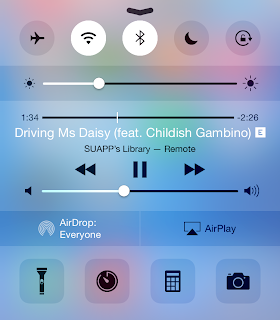
I can't recall how many times I've left the Remote app, reached a song I didn't like, and instinctively pulled up Control Center only to be disappointed with music controls for the iPhone music app. I can't imagine a situation where you would have your iPhone controlling music coming from a Mac and playing a different song at the same time. It's more likely that the music being played from your iTunes library is what you're listening to, and what you'd like to control. So, the solution? Grant Remote access to Control Center while connected to an iTunes library. Also, Apple can allow third-party remote apps like Sonos or Spotify to take advantage of this feature.


Controlling an Apple TV
One of the best features Apple added with iOS 8 has been Continuity and Suggested Apps. Continuity allows for seamless transition from one device to another whereas Suggested Apps uses your location to display relevant apps on the lock screen. Now, imagine you're in your living room watching something on your Apple TV. Your iPhone is aware of the Apple TV even if the Remote app is closed. You reach for your iPhone, unlock it, and swipe up on the Remote app shortcut that iOS has conveniently displayed on the lock screen. And just like that, you're already controlling your Apple TV, without having to unlock your iPhone and finding the Remote app.


Going back to the original topic of the Reddit thread I linked to above. A Remote widget is convenient however, I don't think it's likely to come true. First of all, it's inconsistent with the theme of Continuity and Handoff. Since a Remote app shortcut fits the Continuity theme of transitioning from an Apple TV to your iPhone/iPad, it makes more sense to place the shortcut at the same location you'd expect rather than the Today View in Notification Center. Another, minor issue is iOS widgets are placed under the Today View because they're meant to provide a summary of your day. I don't think Apple intended Today View for utility widgets as well. But, I still consider this argument minor because it's still the first version of iOS to allow widgets. Things could change in future releases. Also, keep in mind that Apple placed a Calculator widget in OS X Yosemite's Today View.

Sunday, October 26, 2014

Wallpapers 11: Bubbles

Concept credits: Fruit Animation by Kirill

Currently, the iPhone 6, iPhone 6 Plus, iPad Air, Macbook Pro with Retina Display 15", and iMac with Retina 5K Display are available for download at native resolution. These wallpapers should still work on lower resolution device i.e. iPhone 6 wallpaper will look fine on an iPhone 5S.


iPhone 6 & iPhone 6 Plus


iPad


MacBook Pro


iMac

Friday, September 19, 2014

My Favorite Apps

Soon, millions of people will get their hands on the latest iPhone, and it may be the first iPhone for many. Apple surely knows that. So I thought this was the perfect opportunity to write a list of my favorite apps, in no particular order. This isn't going to be an ultimate guide for the best apps on the App Store, and it's not intended to be.

*App prices may change, I don't plan on updating prices during sales. Some apps offer in-app purchases for unlocking more features.*


Reminders & Lists

I love Clear. It's such a simple and straightforward app — so simple that Reminders were only added a few months ago, but that's the beauty of it. When it comes to productivity, I can't accomplish anything in a cluttered environment and believe me, it doesn't get any more 'clutter free' than Clear. It also syncs with Clear for Mac ($9.99).

Taking Notes

I like Simplenote (free). It's free, looks great and syncs with my Mac. As the name suggests, its also simple, a common theme in this list so far. Some people prefer Evernote (free) for taking notes but I find it overwhelming, especially when all I want to do is jot down a quick note on my iPhone.

Twitter

I use the official Twitter (free) app, nothing fancy here. I'm not a big fan of using clients but if you're looking for the best Twitter experience, the consensus among iPhone users seems to be Tweetbot ($4.99). I just wish the Twitter app synced my timeline with the Twitter app on my Mac, which by the way, Tweetbot does.

News & RSS

When it comes to news nothing beats Flipboard (free). I don't know what it is about Flipboard but ever since I started using it, it has been virtually impossible to use another news app on my iPhone — no matter how hard I try. After many attempts I've given up and just accepted that there's no alternative.

As for RSS, I've stuck with Reeder 2 ($4.99). There are a few alternative RSS readers out there like Unread ($4.99) but I'm happy with Reeder, not much to complain about.

Every iPhone also needs a read-it-later app. I prefer Instapaper (free) but Pocket (free) is just as awesome; you really can't go wrong with either service.

Music

Local music files are almost never stored on my iPhone, so instead I like to stream music. There are many options to choose from like Spotify (free), Rdio (free) etc. I use Spotify but all it really boils down to is preference and whether the service is available in your country. Having a Mac app is also a big deal for me.

I also absolutely love SoundCloud (free). As a big music enthusiast, SoundCloud is an incredible tool for discovering new music and following the artists you already love. I urge you to give SoundCloud a shot, I'm glad I did.

Podcasts

I've been enjoying Overcast (free) lately, but there are many great apps for listening to podcasts. In fact, here are a few that Overcast recommends if you don't like the app: Instacast (free), Castro ($3.99), Downcast ($2.99), and more. I even don't mind the default Podcasts app that comes pre-installed with iOS 8. (Some will strongly disagree with that last statement.)

Documents

I primarily use Dropbox (free) for storing documents and other important files just because I like to have those files accessible on literally every device I own. But, if you're not a big fan of cloud storage, Documents (free) is another excellent option that does a bit more and is probably the closest you'll ever get to a file system on an iPhone.

Games

I don't play much games on my iPhone, as I find other dedicated devices for gaming offer a better experience. But some of my favorites that I think every iOS device owner should at least try are: Groove Coaster Zero (free), Letterpress (free), QuizUp (free), and Threes! ($1.99). After all, you're getting the best app store for games! (And the best app store in general.)

More Cool Apps

IFTTT (free) is a common "cool app" for setting up recipes like automatically downloading Facebook photos that you were tagged in. I don't currently use it but definitely give it a try, there's quite a bit of combinations that you can try out.

Another cool app, that I actually do use is TalkTo (free) which lets you send messages to stores asking anything from closing times to whether an item is in-stock or not. Very convenient and it works. From my experience, replies usually take around 5-10 minutes but I've hit the 20 minute mark before.

EDIT: The TalkTo app has been discontinued, however the TalkTo service has moved to become part of Path Talk (free).

Wolfram|Alpha ($2.99). Wolfram|Alpha completes Google (that's how good it is), so if you don't already know what Wolfram|Alpha is please try it — the website is entirely free to use. You can technically bookmark the website and have access to everything but I just love Wolfram|Alpha so much that I justified paying for an app.


If there's a category that I didn't include then I either didn't consider it essential or I currently use a default app to get the job done (examples: for calendars I use Calendar and for web-browsing I use Safari). 

It's always funny to write posts like this and realize how many of my favorite apps are free, considering the sum of money I've spent on the App Store.

Monday, August 25, 2014

Tydlig is Free for Apple Store App Users

What might possibly be the best iOS calculator app, Tydlig, is now free if you have the Apple Store app installed on your device. Tydlig is being touted as a "work hard" app for students going back to school this fall. The offer will run until September 12 and then will be updated to feature the next app. According to Apple:
This month we're celebrating four themes that represent the life of a college student: Get going. Head out. Work hard. Wind down.

This week, work hard with Tydlig, a calculator reimagined to help you with everything from tips and discounts to real-time graphing. Work smarter, not harder, by referencing your previous calculations, and share your work by printing or exporting results as a high-quality PDF. 

Sunday, August 17, 2014

Apple Wins Emmy Award for 'Misunderstood' Holiday Ad

A well deserved win. If you want to see all the nominees for the 2014 Outstanding Commercial Emmy including GE and Nike, head over to 9to5Mac.

Thursday, July 31, 2014

Wallpapers 9: Paint Splatter

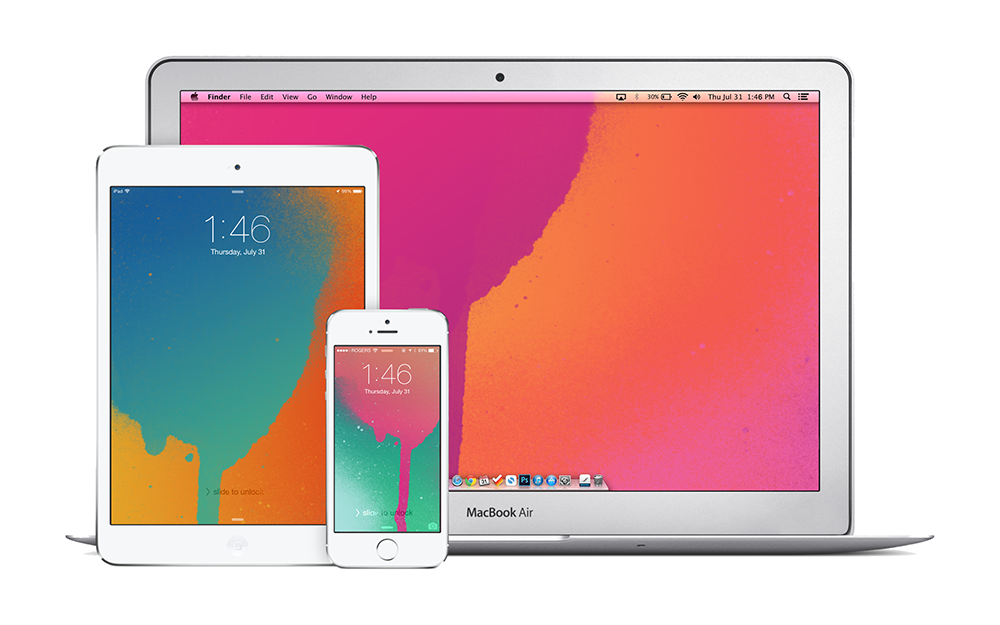
Got a sudden inspiration to create wallpapers from the recent iTunes Gift Cards design. I know it's late but hey, I like them. Also for the first time, all wallpapers are available for iPhone, iPad and Mac.


iPhone

Blue on Orange for iPhonePink on Green for iPhonePink on Orange for iPhonePurple on Blue for iPhone


iPad

Blue on Orange for iPadPink on Green for iPadPink on Orange for iPadPurple on Blue for iPad


Mac

Blue on Orange for MacPink on Green for MacPink on Orange for MacPurple on Blue for Mac

Wednesday, July 30, 2014

The iTime is Already a Failure

According to John C. Dvorak "The Apple iTime Is Destined to Fail". This is coming from the man that predicted the iPhone was destined to be a failure back in 2007. Also, can we take a moment to realize where Apple would be if it was taking advice from someone that thinks "a flip-open design to double the screen real estate" would be a good idea.

Wednesday, July 23, 2014

Apple's Q3 2014 Results

Apple said it sold 4.41 million Mac computers in the quarter ended June 28, an increase of 17.6% from the same period a year earlier. It also marked the third straight quarter that Mac sales rose on a year-on-year basis, bouncing back after Mac sales fell 10% in the past fiscal year to September.

Sales of iPads are going in the other direction, with the number of units sold falling 9.2% after a 16% drop three months earlier.

Further highlighting the trend, the gap in revenue between the two products is fast closing. Apple sold $5.44 billion worth of Macs in the quarter, compared with $5.9 billion in iPads. The last time Mac revenue topped iPad’s was in 2011 when the tablet was still in its early days.
The more interesting bit of news to come out of Apple's financial results announcement yesterday.

Tuesday, July 15, 2014

Apple & IBM Partner Up

Apple and IBM just announced a massive partnership that can give Apple a major advantage in the business market. The new partnership will entail IBM creating more than 100 apps that tap into IBM's services including device management, security, analytics and mobile integration exclusively for iPhones and iPads and selling them to their clients worldwide. In return, Apple will provide 24/7 AppleCare support for IBM's enterprise customers. Ultimately, IBM currently doesn't have a strong mobile presence in enterprise, so teaming up with Apple provides a major incentive for customers to choose iOS and IBM.

The partnership will also put pressure on Microsoft who has been making a serious push into cloud and mobile services for enterprise and previous industry leader, BlackBerry whom has been fighting to regain its title after years of declining profits.

UPDATE: Apple Press Info

Wednesday, July 9, 2014

Spotify Is Finally Coming to Canada

But before you get too excited, Spotify in Canada may take a little while. At the moment Spotify has only granted access to a select few that signed up through Spotify's Canada page or the Spotify app which is currently unavailable. 

According to Spotify:
While the Spotify app is now available in the iOS and Android stores we have not officially launched in Canada. Right now users can download the app and sign up for a waiting list on Spotify.ca. 
We know there is a lot of excitement and demand for Spotify in Canada and we want to reward those fans who have patiently waited for the launch, so we will begin sending out invitations to users who have signed up on the online waiting list shortly. Over the coming months we will be gradually inviting users on to the service in an attempt to systematically scale Spotify in the most manageable way possible. 
When Spotify launches in a specific country we always make sure that the experience is curated for local tastes and culture. That means great local content and local curation of the music discovery experience. Spotify in Canada needs to be much more than just the Canadian version of Spotify in the US. That is why we are taking our time to make sure that the service we launch in Canada is the best possible experience for music fans from B.C. to Nunavut to Newfoundland.
If you want to enter the queue for the pre-launch invite, you can sign up on Spotify's page or wait for the Spotify app to return to the App Store.

UPDATE: The Spotify app seems to be back and available for download.
UA-42274431-1