Showing posts with label notification center. Show all posts

Wednesday, June 10, 2015

Concept: Expiring Notifications

A clear all button in Notification Center is probably one of the most requested features for iOS. Apple added it on the Apple Watch using Force Touch but "clear all" has yet to make its way over to iOS. It would be very handy to be able to clear out all notifications with a single tap but I would also like to see Apple automate how notifications are handled. This concept will focus on that idea and can be split into two main parts: the first requires some tweaking in Settings and the second won't but will be targeted towards a specific category of apps.

Part 1: Recent Notifications
Let's start by analyzing the current (iOS 8.3) offering for controlling notifications. Some default Apple apps get special treatment and have more options while some have less but this is what the typical app will offer you: Do you want notifications from this app? If so, how many do you want to be displayed in Notification Center? Will these notifications make a sound, appear on your lock screen and so on.


What iOS offers for notification management works great except for the "Show in Notification Center" option. Show the 5 most recent notifications should automatically remove old items once the notification count exceeds the set limit, instead iOS stores all of those notifications and displays them once you delete one of the recent items. Personally, I don't get why anyone would want to see month-old notifications that were hidden.

The solution? A new setting that allows you to control how long iOS holds on to notifications sent from a certain app. For example in Mail, you can specify that you only want Notification Center to hold on to email notifications for today, and once tomorrow starts, clear all old Mail notifications from that day. Most people don't read and reply to their emails in Notification Center so it makes sense to have the most recent emails for that day only and maybe reserve a permanent spot for emails from contacts you've set as VIPs until they're read.


Part 2: Expiring Notifications
There's nothing more frustrating than receiving a notification from a store's app for a deal or a coupon that is valid throughout the weekend but once that weekend ends, the notification just remains in Notification Center until you manually clear it. The fix is quite a simple idea, if that notification had an expiry date and could just remove itself once it served its purpose then there wouldn't be any confusion and Notification Center wouldn't fill up with useless notifications. 

This works great for coupons but it works even better for live streaming apps like Twitch and especially Periscope, where live streams are usually very short. There have been countless times where I open Periscope through a notification to watch someone's live stream only to be presented with "this live stream has ended" because I was just a few minutes too late. Whereas if this notification was temporarily displayed for the duration of the live stream, then you're less likely to be disappointed and, no one wants a rapidly growing list of useless previous live stream notifications.

Other Ideas
Lastly, here are a few other things that could enhance the notifications experience that I came up with while writing this post. The first is a remind me later feature. It's an obvious feature that Apple already uses for OS X update notifications that prompt you to restart your computer to complete installation. These notifications usually have an "ask me later" menu with a few presets like in an hour or tomorrow. The second feature is also very obvious and already works seamlessly in the Messages app where a notification that is read on one of your devices is automatically removed from all of your other devices using iCloud. It would work perfectly for social media apps like Twitter and Instagram.
Monday, November 17, 2014

How To Improve Apple's Remote App

The other day, I was casually browsing Reddit and came across an intriguing post on the Apple subreddit. What if Apple designed a Today View widget for its Remote app.  My personal experience with the Remote app has been mixed. When it comes to controlling an Apple TV, I've taught myself to unlock my device, and find the Remote app (which I keep in a folder). Of course that also means either using your fingerprint for Touch ID or typing a passcode just to get in. As for the Remote app's second functionality, controlling an iTunes library, it hasn't been that easy. Usually on an Apple TV, the only reason you'd put down your device or close the app is because you've started a TV show or a movie. This means you likely won't need the Remote app for at least 20 minutes. However, it's different when it comes to music. A song will last around 3 minutes on average. Unless iTunes plays a song you're willing to listen to, you're most likely going to hit skip. That's a lot of opening and closing for an app just to do a simple task.

So, we have two fundamental problems: 1) there needs to be an easier way to control music; and 2) there has to be an easier way to access the virtual Apple TV remote.

Controlling Your iTunes Library
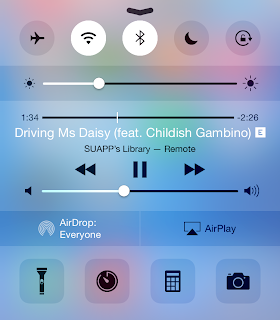
I can't recall how many times I've left the Remote app, reached a song I didn't like, and instinctively pulled up Control Center only to be disappointed with music controls for the iPhone music app. I can't imagine a situation where you would have your iPhone controlling music coming from a Mac and playing a different song at the same time. It's more likely that the music being played from your iTunes library is what you're listening to, and what you'd like to control. So, the solution? Grant Remote access to Control Center while connected to an iTunes library. Also, Apple can allow third-party remote apps like Sonos or Spotify to take advantage of this feature.


Controlling an Apple TV
One of the best features Apple added with iOS 8 has been Continuity and Suggested Apps. Continuity allows for seamless transition from one device to another whereas Suggested Apps uses your location to display relevant apps on the lock screen. Now, imagine you're in your living room watching something on your Apple TV. Your iPhone is aware of the Apple TV even if the Remote app is closed. You reach for your iPhone, unlock it, and swipe up on the Remote app shortcut that iOS has conveniently displayed on the lock screen. And just like that, you're already controlling your Apple TV, without having to unlock your iPhone and finding the Remote app.


Going back to the original topic of the Reddit thread I linked to above. A Remote widget is convenient however, I don't think it's likely to come true. First of all, it's inconsistent with the theme of Continuity and Handoff. Since a Remote app shortcut fits the Continuity theme of transitioning from an Apple TV to your iPhone/iPad, it makes more sense to place the shortcut at the same location you'd expect rather than the Today View in Notification Center. Another, minor issue is iOS widgets are placed under the Today View because they're meant to provide a summary of your day. I don't think Apple intended Today View for utility widgets as well. But, I still consider this argument minor because it's still the first version of iOS to allow widgets. Things could change in future releases. Also, keep in mind that Apple placed a Calculator widget in OS X Yosemite's Today View.
UA-42274431-1