Showing posts with label mac. Show all posts

Wednesday, June 10, 2015

Concept: Expiring Notifications

A clear all button in Notification Center is probably one of the most requested features for iOS. Apple added it on the Apple Watch using Force Touch but "clear all" has yet to make its way over to iOS. It would be very handy to be able to clear out all notifications with a single tap but I would also like to see Apple automate how notifications are handled. This concept will focus on that idea and can be split into two main parts: the first requires some tweaking in Settings and the second won't but will be targeted towards a specific category of apps.

Part 1: Recent Notifications
Let's start by analyzing the current (iOS 8.3) offering for controlling notifications. Some default Apple apps get special treatment and have more options while some have less but this is what the typical app will offer you: Do you want notifications from this app? If so, how many do you want to be displayed in Notification Center? Will these notifications make a sound, appear on your lock screen and so on.


What iOS offers for notification management works great except for the "Show in Notification Center" option. Show the 5 most recent notifications should automatically remove old items once the notification count exceeds the set limit, instead iOS stores all of those notifications and displays them once you delete one of the recent items. Personally, I don't get why anyone would want to see month-old notifications that were hidden.

The solution? A new setting that allows you to control how long iOS holds on to notifications sent from a certain app. For example in Mail, you can specify that you only want Notification Center to hold on to email notifications for today, and once tomorrow starts, clear all old Mail notifications from that day. Most people don't read and reply to their emails in Notification Center so it makes sense to have the most recent emails for that day only and maybe reserve a permanent spot for emails from contacts you've set as VIPs until they're read.


Part 2: Expiring Notifications
There's nothing more frustrating than receiving a notification from a store's app for a deal or a coupon that is valid throughout the weekend but once that weekend ends, the notification just remains in Notification Center until you manually clear it. The fix is quite a simple idea, if that notification had an expiry date and could just remove itself once it served its purpose then there wouldn't be any confusion and Notification Center wouldn't fill up with useless notifications. 

This works great for coupons but it works even better for live streaming apps like Twitch and especially Periscope, where live streams are usually very short. There have been countless times where I open Periscope through a notification to watch someone's live stream only to be presented with "this live stream has ended" because I was just a few minutes too late. Whereas if this notification was temporarily displayed for the duration of the live stream, then you're less likely to be disappointed and, no one wants a rapidly growing list of useless previous live stream notifications.

Other Ideas
Lastly, here are a few other things that could enhance the notifications experience that I came up with while writing this post. The first is a remind me later feature. It's an obvious feature that Apple already uses for OS X update notifications that prompt you to restart your computer to complete installation. These notifications usually have an "ask me later" menu with a few presets like in an hour or tomorrow. The second feature is also very obvious and already works seamlessly in the Messages app where a notification that is read on one of your devices is automatically removed from all of your other devices using iCloud. It would work perfectly for social media apps like Twitter and Instagram.
Monday, November 17, 2014

How To Improve Apple's Remote App

The other day, I was casually browsing Reddit and came across an intriguing post on the Apple subreddit. What if Apple designed a Today View widget for its Remote app.  My personal experience with the Remote app has been mixed. When it comes to controlling an Apple TV, I've taught myself to unlock my device, and find the Remote app (which I keep in a folder). Of course that also means either using your fingerprint for Touch ID or typing a passcode just to get in. As for the Remote app's second functionality, controlling an iTunes library, it hasn't been that easy. Usually on an Apple TV, the only reason you'd put down your device or close the app is because you've started a TV show or a movie. This means you likely won't need the Remote app for at least 20 minutes. However, it's different when it comes to music. A song will last around 3 minutes on average. Unless iTunes plays a song you're willing to listen to, you're most likely going to hit skip. That's a lot of opening and closing for an app just to do a simple task.

So, we have two fundamental problems: 1) there needs to be an easier way to control music; and 2) there has to be an easier way to access the virtual Apple TV remote.

Controlling Your iTunes Library
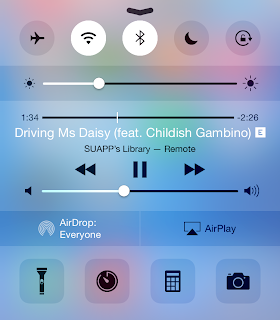
I can't recall how many times I've left the Remote app, reached a song I didn't like, and instinctively pulled up Control Center only to be disappointed with music controls for the iPhone music app. I can't imagine a situation where you would have your iPhone controlling music coming from a Mac and playing a different song at the same time. It's more likely that the music being played from your iTunes library is what you're listening to, and what you'd like to control. So, the solution? Grant Remote access to Control Center while connected to an iTunes library. Also, Apple can allow third-party remote apps like Sonos or Spotify to take advantage of this feature.


Controlling an Apple TV
One of the best features Apple added with iOS 8 has been Continuity and Suggested Apps. Continuity allows for seamless transition from one device to another whereas Suggested Apps uses your location to display relevant apps on the lock screen. Now, imagine you're in your living room watching something on your Apple TV. Your iPhone is aware of the Apple TV even if the Remote app is closed. You reach for your iPhone, unlock it, and swipe up on the Remote app shortcut that iOS has conveniently displayed on the lock screen. And just like that, you're already controlling your Apple TV, without having to unlock your iPhone and finding the Remote app.


Going back to the original topic of the Reddit thread I linked to above. A Remote widget is convenient however, I don't think it's likely to come true. First of all, it's inconsistent with the theme of Continuity and Handoff. Since a Remote app shortcut fits the Continuity theme of transitioning from an Apple TV to your iPhone/iPad, it makes more sense to place the shortcut at the same location you'd expect rather than the Today View in Notification Center. Another, minor issue is iOS widgets are placed under the Today View because they're meant to provide a summary of your day. I don't think Apple intended Today View for utility widgets as well. But, I still consider this argument minor because it's still the first version of iOS to allow widgets. Things could change in future releases. Also, keep in mind that Apple placed a Calculator widget in OS X Yosemite's Today View.

Sunday, October 26, 2014

Wallpapers 11: Bubbles

Concept credits: Fruit Animation by Kirill

Currently, the iPhone 6, iPhone 6 Plus, iPad Air, Macbook Pro with Retina Display 15", and iMac with Retina 5K Display are available for download at native resolution. These wallpapers should still work on lower resolution device i.e. iPhone 6 wallpaper will look fine on an iPhone 5S.


iPhone 6 & iPhone 6 Plus


iPad


MacBook Pro


iMac

Monday, October 13, 2014

Concept: Create Calendar Events With Natural Language & More Using Spotlight Search


With iOS 8 and OS X Yosemite, Apple made Spotlight Search smarter and more relevant by suggesting nearby places to eat, websites, apps from the App Store just to name a few. It's clear that Apple wants to make Spotlight Search the single place to start your searching on iOS and Mac. However, I think Spotlight Search still has much more potential, and it starts by breaking the restrictions of being a mere search engine. Google search, for example, is a search engine but, it can still show you local weather and solve simple mathematical calculations using dedicated widgets. I'm not suggesting Apple should develop it's own search engine but, continue to improve Spotlight Search with the goal of accomplishing more with less effort.

One of the features that usually distinguish third-party calendar apps from Apple's Calendar app is the ability to interpret natural language and create an event out of a simple sentence. Surprisingly, Apple already does this, on Mac only.


In fact, typing "apple special event on october 16 2014 from 1pm to 3pm" into the OS X Calendar app's Quick Event feature will produce exactly what you'd expect:


Of course, two obvious limitations to having Quick Event in Spotlight Search on iOS are Spotlight Search can't be accessed on the lock-screen nor within an app. However, in a situation where you just want to create an event quickly and avoid the menus of the Calendar app, being able to type into Spotlight Search can prove to be quite useful. Siri comes to mind as a solution to the problem however, you may feel uncomfortable speaking out-loud to your virtual assistant at some locations. It also happens that, creating Calendar events isn't the only feature Spotlight Search can borrow from Siri and — in some cases handle better.

The first is an obvious one, defining words. It's a strange omission. iOS already has a built-in dictionary so it can't be very difficult to start accepting "define" followed by a word in Spotlight Search. The same can be done for thesaurus and translating words. Typing a city or country name in Spotlight Search can bring up weather information. Also, by referencing Wolfram|Alpha, Spotlight Search can tap into a vast database allowing Spotlight Search to answer questions without a Google search (which I'm sure Apple would love) or perform complex mathematical calculations. For example, Spotlight Search can begin solving simple mathematical equations like 2 + 2 or the square root of 16 using the built-in Calculator app and then use Wolfram|Alpha for more complicated computations like solving for a variable or integrating a function. Again, Siri is already capable of doing that, but it makes less sense to use your voice when exponents and fractions are involved. Side note: typing "2 + 2 =" into Spotlight Search on the latest version of iOS will display a Wikipedia entry titled "2 + 2 = 5" as the top result. I though that was funny.


These are just a few starting points to improve Spotlight Search. It would be great if Spotlight Search opened up to third party developers too, but I wouldn't expect this to happen any time soon, considering Siri still can't interact with any apps or services unless predefined by Apple.

Friday, August 22, 2014

How To Get Your Mac To Count Highlighted Words

Earlier today, I was looking for a way to add the ability to count how many words were highlighted on my Mac. So, after a quick Google search, I came across one implementation on the Macworld forums by guillaumegete. I'll admit, presentation wise, it's not the greatest but it does what I want, it counts the number of characters, signs and paragraphs that you have highlighted.

For anyone wondering, I'm currently running OS X Mavericks 10.9.4 and according to the forum post, this implementation has been tested OS X 10.6 and 10.7.

To add the feature, launch Automator on your Mac, select Service, search for "Run AppleScript" and then add the following code:
on run {input, parameters}
     try
          set MyText to input as string
          set NombreSignes to the number of characters of MyText
          set NombreMots to the number of words of MyText
          set NombrePara to the number of paragraphs of MyText
          set LeResultat to "The selected text contains :" & return & "- " & NombreSignes & " sign(s) ;" & return & "- " & NombreMots & " word(s) ;" & return & "- " & NombrePara & " paragraph(s)."
          display dialog LeResultat buttons {"OK"} default button 1 with icon note
     on error errmsg number errnum
          display dialog errmsg & " [" & errnum & "]" buttons {"OK"} default button 1 with icon stop
  
     end try
     return input
end run
Save the Service and name it whatever you'd like, I called it "Character Count". To use the Service, highlight some text, right click, hover over "Services" and select (in this case) "Character Count".

Tuesday, August 12, 2014

iOS 8 Changes Impacting Retail Tracking Startup Nomi

Nomi had to lay off a third of its employees due to privacy changes in iOS 8 which will randomize the MAC address broadcasted by iPhones while searching for a Wi-Fi network. According to Re/code:
Nomi sold a service to retail stores that allows them to track how many shoppers visit their stores, where they spend time inside the stores and how frequently they return. [...] repeat visitor information was mainly gathered by keeping track of an iPhone’s MAC address — the 12-character identifier that is broadcast when a phone is searching for nearby Wi-Fi networks.
Apple basically wants retailers to use its own technology, iBeacons for retail tracking. Nomi CEO Marc Ferrentino said in an interview that "Apple is signalling to the market that beacons are the way that they want this to be done."

Thursday, July 31, 2014

Wallpapers 9: Paint Splatter

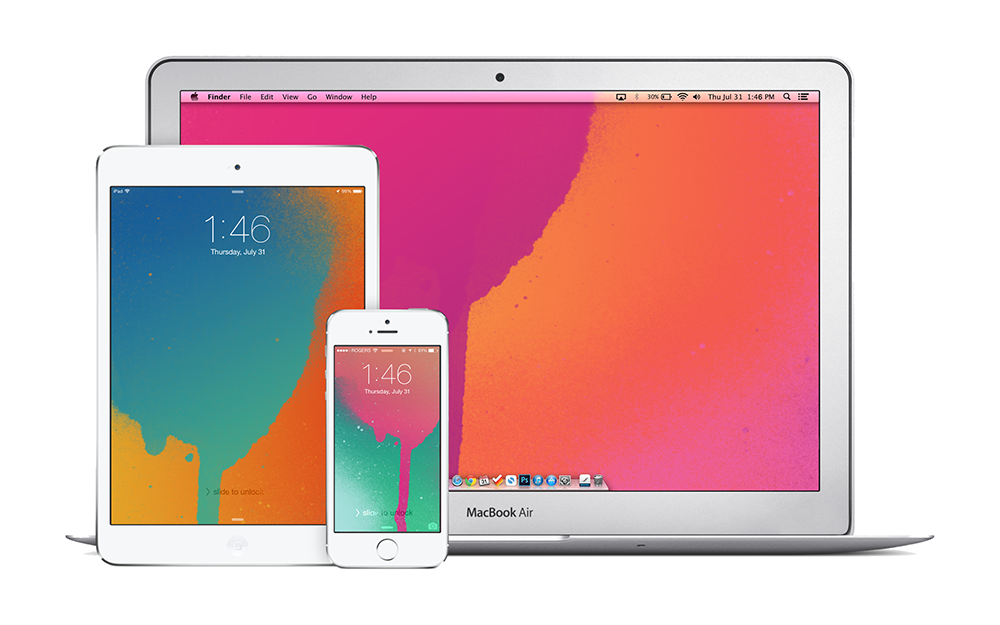
Got a sudden inspiration to create wallpapers from the recent iTunes Gift Cards design. I know it's late but hey, I like them. Also for the first time, all wallpapers are available for iPhone, iPad and Mac.


iPhone

Blue on Orange for iPhonePink on Green for iPhonePink on Orange for iPhonePurple on Blue for iPhone


iPad

Blue on Orange for iPadPink on Green for iPadPink on Orange for iPadPurple on Blue for iPad


Mac

Blue on Orange for MacPink on Green for MacPink on Orange for MacPurple on Blue for Mac

Shazam Comes to Mac

I don't think Shazam needs an introduction but, if you still don't know what it is; it's a service that identifies music and some TV shows just by listening. It's quite fascinating the first time you see it in action — especially popular songs that the algorithm can figure out just by hearing 2 seconds of the intro.

As a mobile only service for many years, getting Shazam on a Mac is exciting news. The Mac app just sits in the menu bar listening and identifying any music it hears. The always on feature was introduced to mobile a while ago but I never really enabled it for obvious battery life concerns. Now that it's on Mac, I'm willing to give 'always on' a try. Interestingly, there doesn't appear to be a simple 'Shazam-ing' button — it's either always on or always off.

There isn't much to point out here but, syncing with other devices would be great. Shazam has always served a secondary purpose for me besides the whole identification aspect. As someone who loves music, Shazam was sort of a to-do list for songs I wanted to listen to, so not having access to my iPhone tags on my Mac is huge.

Get Shazam for Mac

Wednesday, July 23, 2014

Apple's Q3 2014 Results

Apple said it sold 4.41 million Mac computers in the quarter ended June 28, an increase of 17.6% from the same period a year earlier. It also marked the third straight quarter that Mac sales rose on a year-on-year basis, bouncing back after Mac sales fell 10% in the past fiscal year to September.

Sales of iPads are going in the other direction, with the number of units sold falling 9.2% after a 16% drop three months earlier.

Further highlighting the trend, the gap in revenue between the two products is fast closing. Apple sold $5.44 billion worth of Macs in the quarter, compared with $5.9 billion in iPads. The last time Mac revenue topped iPad’s was in 2011 when the tablet was still in its early days.
The more interesting bit of news to come out of Apple's financial results announcement yesterday.
UA-42274431-1