Thursday, July 31, 2014

Wallpapers 9: Paint Splatter

Got a sudden inspiration to create wallpapers from the recent iTunes Gift Cards design. I know it's late but hey, I like them. Also for the first time, all wallpapers are available for iPhone, iPad and Mac.
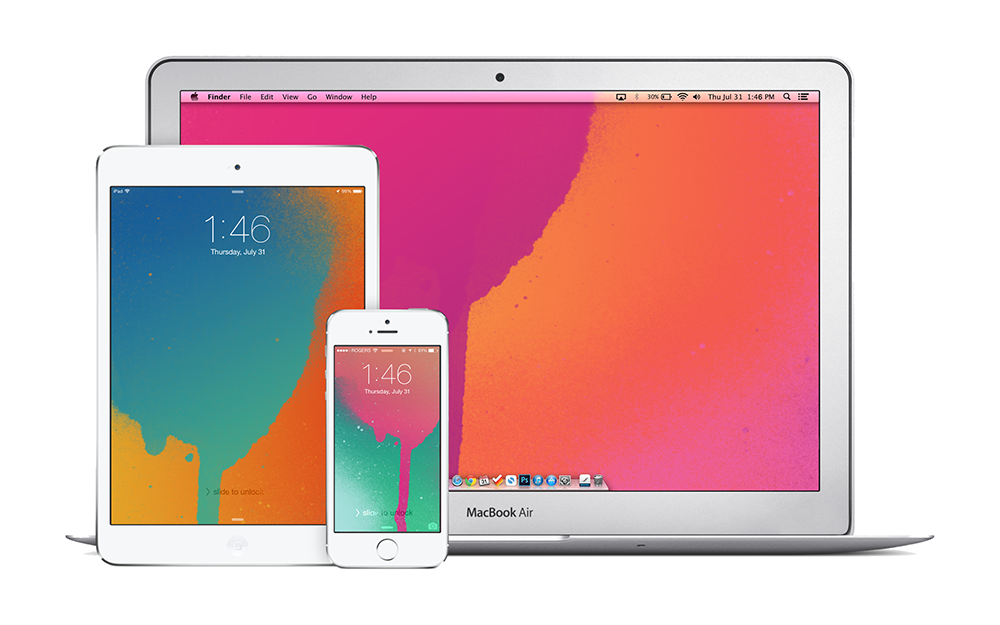

iPhone

Blue on Orange for iPhonePink on Green for iPhonePink on Orange for iPhonePurple on Blue for iPhone


iPad

Blue on Orange for iPadPink on Green for iPadPink on Orange for iPadPurple on Blue for iPad


Mac

Blue on Orange for MacPink on Green for MacPink on Orange for MacPurple on Blue for Mac

Shazam Comes to Mac

I don't think Shazam needs an introduction but, if you still don't know what it is; it's a service that identifies music and some TV shows just by listening. It's quite fascinating the first time you see it in action — especially popular songs that the algorithm can figure out just by hearing 2 seconds of the intro.

As a mobile only service for many years, getting Shazam on a Mac is exciting news. The Mac app just sits in the menu bar listening and identifying any music it hears. The always on feature was introduced to mobile a while ago but I never really enabled it for obvious battery life concerns. Now that it's on Mac, I'm willing to give 'always on' a try. Interestingly, there doesn't appear to be a simple 'Shazam-ing' button — it's either always on or always off.

There isn't much to point out here but, syncing with other devices would be great. Shazam has always served a secondary purpose for me besides the whole identification aspect. As someone who loves music, Shazam was sort of a to-do list for songs I wanted to listen to, so not having access to my iPhone tags on my Mac is huge.

Get Shazam for Mac

Wednesday, July 30, 2014

The iTime is Already a Failure

According to John C. Dvorak "The Apple iTime Is Destined to Fail". This is coming from the man that predicted the iPhone was destined to be a failure back in 2007. Also, can we take a moment to realize where Apple would be if it was taking advice from someone that thinks "a flip-open design to double the screen real estate" would be a good idea.

Tuesday, July 29, 2014

MacBook Pro with Retina Display Receives an Update

Apple gave the MacBook Pro with Retina Display line-up an update this morning. The update includes a boost in processing power, minor price cuts and most notably, double the RAM on both entry-level configurations.

The best part about today's spec upgrade is that it happened during Apple's annual back to school promotion. Students looking to purchase a MacBook for school can take advantage of the promotion and not have to worry that a better machine will be announced in less than three months.

Read Apple's Press Release

Hilton to Replace Keys with Smartphones

The Verge: 
The company [Hilton] plans to let customers use their smartphones to unlock room doors at most Hilton-owned hotels by the end of 2016.
I can't recall how many times I've stood in front of a hotel room's door and hoped I could just pull out my iPhone and unlock the door with a tap. Of course, the same applies for every situation I'm forced to pull out a wallet but, it's a start.

Another part of Hilton's initiative will allow customers to book and preview rooms using their smartphones, thereby bypassing the need to visit the front desk.

Friday, July 25, 2014

The Best Example of Bad Design by Apple

Let's say for whatever reason, you decide to turn on Airplane Mode on your iPhone — maybe you're running low on battery or you're travelling out of country. Anyways, your iPhone is now disconnected and you decide to open an app that requires some form of connectivity to function. Let's take a simple example, Safari. You try to load up a website and then you're prompted with a dialogue box that says "Turn off Airplane Mode or Use Wi-Fi to Access Data" and your options are "OK" and "Settings". "OK" will dismiss the dialogue box and "Settings" will throw you into the settings app so you can turn off Airplane Mode or turn wi-fi on.

There are two problems here:

1) The settings button is fine, it does exactly what it's meant to do but, the problem lies with OK. To a normal person, OK would indicate giving permission — OK, turn off Airplane Mode so I can view this content, not OK, dismiss what you just told me and leave me having to do all the work myself. Somehow, OK needs to become something more obvious like cancel either by rewording the prompt or following the suggestion I'm going to make next...

2) The approach is all wrong, it feels like the type of approach Apple would take before iOS 7; before Control Center which is supposed to limit the number of times you visit settings for simple tasks like turning wi-fi on and off. So why are we still being yanked out of an app to do a simple task? At the very least, bring up Control Center as opposed to the settings app but, we can still do even better than that.

Instead of being confined to the basic utility of buttons, switches can be incorporated to simplify the process of turning certain settings on and off. Users are already familiar with switches and will definitely understand the meaning of Cancel. This approach is a rough idea I came up with and it may have some flaws. For example, it wouldn't make sense to just use Cancel as that will indicate no changes are applied so perhaps the inclusion of a "Done" button that only becomes clickable if changes are made would be more appropriate.


If you feel that complaining about something so simple is a bit of a stretch, try it for yourself. To this day, I still make the mistake of hitting OK accidentally, otherwise I wouldn't be writing about this issue here. Also, this isn't the only example of dialogue boxes with vague options and a tedious implementation for the user. Another example will result from having wi-fi turned off while using the Maps app. In the end, what it comes down to is detail. The smallest details are what add up to an outstanding experience and this, in my opinion is one detail Apple should take some time to address.

Wednesday, July 23, 2014

Apple's Q3 2014 Results

Apple said it sold 4.41 million Mac computers in the quarter ended June 28, an increase of 17.6% from the same period a year earlier. It also marked the third straight quarter that Mac sales rose on a year-on-year basis, bouncing back after Mac sales fell 10% in the past fiscal year to September.

Sales of iPads are going in the other direction, with the number of units sold falling 9.2% after a 16% drop three months earlier.

Further highlighting the trend, the gap in revenue between the two products is fast closing. Apple sold $5.44 billion worth of Macs in the quarter, compared with $5.9 billion in iPads. The last time Mac revenue topped iPad’s was in 2011 when the tablet was still in its early days.
The more interesting bit of news to come out of Apple's financial results announcement yesterday.

Tuesday, July 22, 2014

New MacBook Air Ad

One of my favorite Apple advertisements to date. Makes you want to grab the nearest pair of Beats just to listen to it.


UPDATE: The song by Hudson Mohawke "Chimes" is now on SoundCloud and iTunes.

Saturday, July 19, 2014

Video Proves iPhone 6 Sapphire Glass Isn't Perfect

Video

The main takeaway is that the front panel Apple will supposedly use for the iPhone 6 isn't indestructible. Neither sapphire glass used in the panel nor Gorilla Glass can withstand being rubbed with sandpaper but, sapphire is more resistant to scratching - as it should be. Since sapphire is higher than sandpaper on Mohs Scale, it shouldn't have been scratched, meaning the new iPhone probably won't use pure sapphire but a mixture containing sapphire. A mixture of materials will also alow the panel to be more flexible.

As for the "not indestructible" part, you'll just have to watch the video and see for yourself.
UA-42274431-1