


Thursday, August 7, 2014
Wallpapers Bonus: Ferris Wheel
Here's a picture I took a few weeks ago that I thought would make a great wallpaper.

Wednesday, August 6, 2014
Foursquare 8.0
Foursquare just launched their app redesign that focuses on location-based recommendations. Foursquare's move to splitting Foursquare and moving check-ins to their new app Swarm has angered many long time users. I, on the other hand, am part of a minority that is excited to try out the new Foursquare app. I rarely used Foursquare in the past for it's main functionality — checking-in, so the app split doesn't bother me. I've yet to find a favorite app in the 'find new things to do/places to eat around me' category and the new Foursquare app has a good chance of occupying that spot on my iPhone, with its vast database of user check-ins and tips.
Timex Announces the Ironman One GPS+
Earlier today, Timex announced a new smartwatch that is supposed to combine Timex's expertise in watch design with Qualcomm's technology and free 3G data for a year as part of a partnership with AT&T to compete in the smartwatch market but, I honestly don't see enough appeal. There are a few main problem that really hold the watch back.
USA Today:
If everything I mentioned above wasn't enough, the Ironman One GPS+ will only have enough juice to keep it running for 8 hours with GPS on and 3 days otherwise. Also, to top it all off, the watch costs $399.95. Of course, that is before the first year is up and you're stuck paying AT&T a monthly fee for a watch that's only good for telling time and uploading your runs to fitness websites and social media. Don't expect to get your money's worth on added functionality as Timex has no initial plans to support third party apps.
Also, According to USA Today:
USA Today:
The upcoming Timex smartwatch is primarily targeted at runners. It has built-in GPS to track your speed, distance, pace and other workout detailsFirst of all, one of the biggest features being touted is the ability to use the watch independently of a smartphone. But, it won't — and is not meant to — replace the smartphone entirely. The Ironman will be a great option for a run where you might choose a watch over a phone but then, for the majority of the time you do have your smartphone with you, the watch won't tether to your device to display notifications, make or receive phone calls etc. The Ironman One GPS+ does more than just tracking runs of course, but why you would choose it over your smartphone is another problem. For example, the Ironman allows for messaging over email but to do so you'll have to use a keyboard. As you can imagine typing more than 5 words on a 1.5 inch screen will drive you insane. Timex's smartwatch also lacks a microphone for voice controls to ease the pain of typing on-screen or perform tasks like Siri or Google Now.
If everything I mentioned above wasn't enough, the Ironman One GPS+ will only have enough juice to keep it running for 8 hours with GPS on and 3 days otherwise. Also, to top it all off, the watch costs $399.95. Of course, that is before the first year is up and you're stuck paying AT&T a monthly fee for a watch that's only good for telling time and uploading your runs to fitness websites and social media. Don't expect to get your money's worth on added functionality as Timex has no initial plans to support third party apps.
Also, According to USA Today:
Olsen dismisses the fact that many young people don't wear watches and says many do so once landing their first job. "People wear watches for different reasons, not necessarily to tell time. It could be a fashion element. It could be technology. It could be a status symbol depending on the price points."I would've accepted Timex sticking to the "watch for runners" theme but calling this watch a "fashion element" or "status symbol" isn't exactly the impression you get from it. I already established the fact that technology on the Ironman One GPS+ is not enough, so what exactly will attract customers isn't clear.
Saturday, August 2, 2014
“How To Alienate Your Users And Make Them To Leave Your Successful App”
A 5 step guide on how to alienate your users, by Aleyda Solis:
As for "clear arguments", here's Facebook's: "Messenger is much faster. You'll get new messages instantly and can reply right away." Great. Perfect for anyone browsing their Facebook feed and receiving a message from a Facebook friend. They'll be on their way to "reply right away" after leaving Facebook and being thrown into the fast Messenger app.
And so with that said, I'd like to add a new step to alienate your users.
An entertaining post about Foursquare's new strategy of splitting their popular app — Foursquare, into 2. But, this isn't about Foursquare. I never was a big Foursquare user so if anything, I'm excited to try their new app. My frustration is with Facebook. To me, the first point perfectly sums up how I feel about Facebook forcing you to download the Messenger app by removing messaging functionality from the Facebook app. The Messenger app is great and might I add, looks much better than the original Facebook app. But, that doesn't justify forcing a transition especially when users like me just want to send a message and aren't interested in Facebook's take on group messaging, wi-fi calling, voice messages, stickers etc.
- Split your app in two and force users to download your new app in order to have the same functionality they usually enjoyed before with just one, easy to use app. You will have clear arguments: You need to grow and diversify, your functionalities need to evolve and you need to monetize them in different ways, so it would be very complex to keep them all in just one app.
As for "clear arguments", here's Facebook's: "Messenger is much faster. You'll get new messages instantly and can reply right away." Great. Perfect for anyone browsing their Facebook feed and receiving a message from a Facebook friend. They'll be on their way to "reply right away" after leaving Facebook and being thrown into the fast Messenger app.
And so with that said, I'd like to add a new step to alienate your users.
- Leave a shortcut button in your main app to the relocated service because it is fundamental to your main app's functionality. But, users will have to be thrown from app to app just to accomplish a simple task that they once could easily do in the main app.
Once everyone has transitioned into Messenger, maybe Facebook should release an app that lets you write posts because you know, speed and what not. I'll be looking forward to it along with every other frustrated user that gave Messenger a 1 out of 5 rating on the AppStore.
Thursday, July 31, 2014
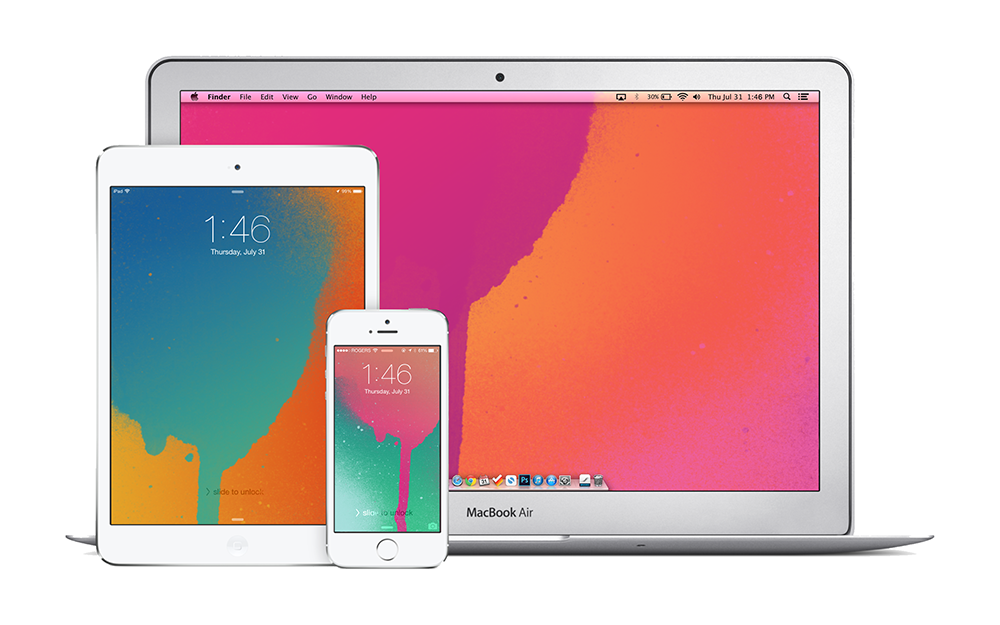
Wallpapers 9: Paint Splatter
Got a sudden inspiration to create wallpapers from the recent iTunes Gift Cards design. I know it's late but hey, I like them. Also for the first time, all wallpapers are available for iPhone, iPad and Mac.
iPhone


iPad


Mac


Shazam Comes to Mac
I don't think Shazam needs an introduction but, if you still don't know what it is; it's a service that identifies music and some TV shows just by listening. It's quite fascinating the first time you see it in action — especially popular songs that the algorithm can figure out just by hearing 2 seconds of the intro.
As a mobile only service for many years, getting Shazam on a Mac is exciting news. The Mac app just sits in the menu bar listening and identifying any music it hears. The always on feature was introduced to mobile a while ago but I never really enabled it for obvious battery life concerns. Now that it's on Mac, I'm willing to give 'always on' a try. Interestingly, there doesn't appear to be a simple 'Shazam-ing' button — it's either always on or always off.
There isn't much to point out here but, syncing with other devices would be great. Shazam has always served a secondary purpose for me besides the whole identification aspect. As someone who loves music, Shazam was sort of a to-do list for songs I wanted to listen to, so not having access to my iPhone tags on my Mac is huge.
Get Shazam for Mac
Wednesday, July 30, 2014
The iTime is Already a Failure
According to John C. Dvorak "The Apple iTime Is Destined to Fail". This is coming from the man that predicted the iPhone was destined to be a failure back in 2007. Also, can we take a moment to realize where Apple would be if it was taking advice from someone that thinks "a flip-open design to double the screen real estate" would be a good idea.
Tuesday, July 29, 2014
MacBook Pro with Retina Display Receives an Update
Apple gave the MacBook Pro with Retina Display line-up an update this morning. The update includes a boost in processing power, minor price cuts and most notably, double the RAM on both entry-level configurations.
The best part about today's spec upgrade is that it happened during Apple's annual back to school promotion. Students looking to purchase a MacBook for school can take advantage of the promotion and not have to worry that a better machine will be announced in less than three months.
Read Apple's Press Release
Hilton to Replace Keys with Smartphones
The Verge:
Another part of Hilton's initiative will allow customers to book and preview rooms using their smartphones, thereby bypassing the need to visit the front desk.
The company [Hilton] plans to let customers use their smartphones to unlock room doors at most Hilton-owned hotels by the end of 2016.I can't recall how many times I've stood in front of a hotel room's door and hoped I could just pull out my iPhone and unlock the door with a tap. Of course, the same applies for every situation I'm forced to pull out a wallet but, it's a start.
Another part of Hilton's initiative will allow customers to book and preview rooms using their smartphones, thereby bypassing the need to visit the front desk.